Agent Modes
The different ways to drive stella — chat in the Command Deck, one-shot runs, judged goal mode, CI monitoring, and parallel fleets — and how to pick between them.
stella has one engine and several ways to drive it. Pick a mode based on how much you want to hand off, and how the work should get checked. For a closer look at what each mode does differently inside the engine, see Agent Engine Paths.
Exploring, iterating, supervising.
Scripts, CI, a single well-defined task, quick questions and cheap edits.
An extra step you opt into when the result needs to carry evidence. The plugin gathers that evidence, and stella checks it against the plugin's rule.
You describe the outcome, not a list of steps. Pass --pipeline <variant> to run
each round's worker turn under a wrapper plugin instead.
"Make CI green and keep it green."
Many tasks at once: a worktree per task by default, or one shared tree with file claims if you ask.
Interactive: the Command Deck
Running stella with no subcommand opens the Command Deck. It isn't a generic terminal
app like htop or vim; it's stella's own tabbed workspace over the same engine that
drives every other mode on this page. One surface, nine tabs, and every tab is a live
view into the same session: what a sub-agent is doing right now, the code graph, the
files this turn touched, your MCP servers. Type to send a prompt. Slash commands open
tabs and overlays.
Click a tab below to see what's actually in it. This isn't an embedded terminal or a
recording. Each pane is taken straight from the deck's own test snapshots
(crates/stella-tui/tests/snapshots/deck/). What you click through is the deck's real
output, not a redrawn copy.
The transcript for the turn in flight — prompts, the live plan, and each stage as it runs.
? lead  ·  needs input                                     0:00:00
└─ ◆ sub:auth  needs input · model glm-5.2 · spend $0.01
     ⚒ mcp__fs__grep trigger → wire automations triggers API
└─ ◆ sub:ci    running    · model glm-5.2-air · spend $0.00
     ⚒ no tool calls yet → watch CI + open PR

  Planning the automations cluster: list, editor, triggers, workflows.
☰  plan  4/7 · Wire the triggers API
── WITNESS ──
── EXECUTE ──
● mcp__fs__read  apps/app/automations/page.tsx  ⎿ 312 lines · 42ms
The full slash-command set, including /inspect and /context, is on
stella chat. Here's what each tab opens:
/help/models/files · /diff/graph/agents · /skills · /mcpThe AGENTS tab (agents installed on disk), skills, and MCP servers.
/settingsThe SETTINGS tab, home to all config, including the engine-config panel.
/sessions · /inbox/exportExport this session's telemetry to a ZIP file plus an HTML dashboard. It only includes this session, so the archive is safe to share.
/clear⏎ inserts a line break. ⌘⏎ or ⌃⏎ submits. Prompts queue while a turn runs, so you
never have to wait for the agent to finish before typing the next thing (Ctrl-T opens
the queue editor). A line that starts with $ runs a shell command right away, inline in
the session transcript, skipping the queue. A line that starts with ! interrupts the
running turn: it stops at the next step boundary, keeps every step it finished, and runs
your words next. A single Esc cancels the turn in progress.
Pressing Esc twice cancels and holds dispatch, so whatever you type next runs first.
Prefer a plain, line-based interface? Use stella --plain (or STELLA_PLAIN=1).
Transcript and palette
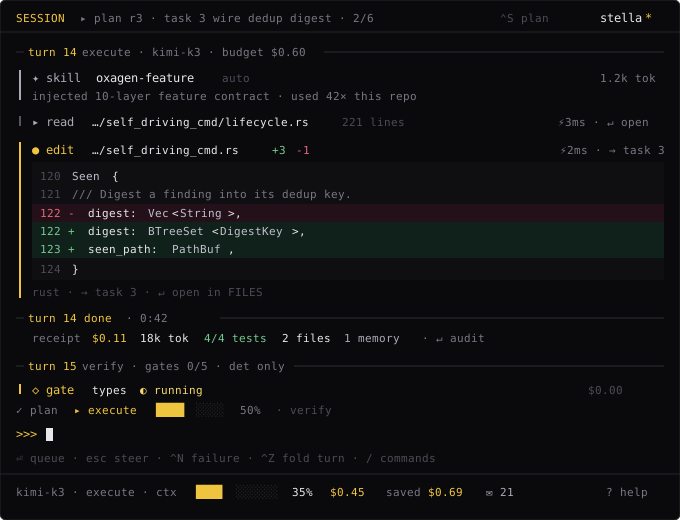
The turn is the basic unit of the transcript. It opens with a rule line, collapses any read that didn't change anything, keeps edits expanded with their diffs, and closes with a receipt: what the turn cost, what it proved, and how much of it never reached a model.
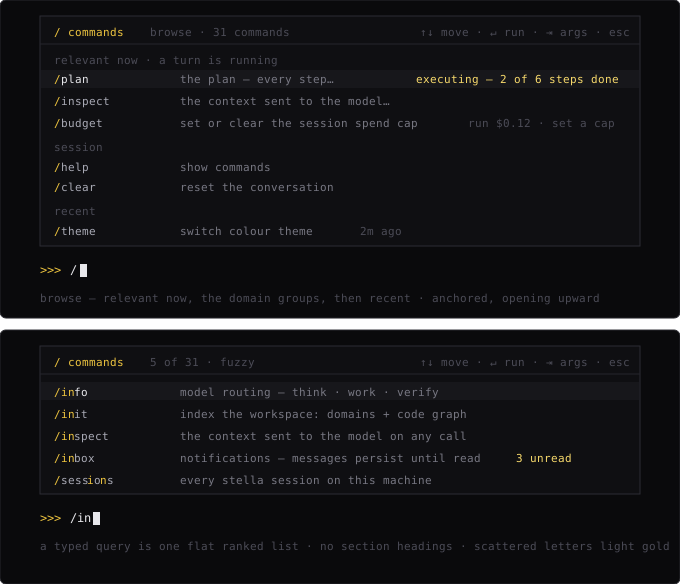
Slash commands open a fuzzy-search palette that knows what's currently running. While a verify turn is in flight, gate commands sort to the top.
One-shot: stella run
This is the non-interactive workhorse: one prompt goes in, and finished work plus an
exit code come back. By default, it runs the plain step loop, which reports what it
changed but doesn't claim to prove anything. Pass --pipeline <variant> to run the turn
under an installed wrapper plugin instead. With a plugin,
--test-command gives its checker a command to test against (this flag is rejected on
the plain default). Combine with --output-format json or stream-json and
--spend-limit for headless automation. See stella run and
Scripting.
stella run "add a --json flag to the export command and update the tests" \
  --pipeline my-verifier --test-command "cargo test -p exporter"
Outcome-driven: goal mode
stella goal doesn't take a task. It takes an objective, and works in judged rounds
until an independent verifier confirms, from evidence, that the objective is met. Where
possible, that verifier runs on a different model family than the worker. Each round is
a plain step-loop turn by default; pass --pipeline <variant> to run every round's
worker turn under an installed wrapper plugin instead. If the run hits
a limit, like a round cap, the --spend-limit, or a worker aborting, it ends the run
marked "not met" rather than assuming success.
stella goal "the test suite passes and there are no clippy warnings"Where stella run executes a single one-shot prompt, stella goal runs judged rounds.
In each round, the worker agent makes progress using the normal
agent step loop. Then a separate verifier model reviews the
evidence and decides whether the objective has been met. The loop ends when the verifier
confirms it, or when a limit is hit: a hard cap of 8 rounds by default, the
--spend-limit cap, or a worker turn aborting. Hitting a limit ends the run and reports
the goal as not met, along with the reason.
How judged rounds work
- The worker works a round. The worker model runs the step loop: it proposes tool calls, runs them, and feeds the results back, making progress toward the objective.
- The verifier checks the evidence. The verifier doesn't just read a summary. It runs as its own limited engine turn, with read-only access to the worker's tools, checking the round's evidence directly and rejecting success that's claimed but not proven.
- Repeat or finish. If the verifier isn't satisfied, another round starts. This continues until the verifier confirms the goal, or a limit (round cap, budget, or abort) ends the run.
Because the verifier checks the evidence directly instead of trusting the worker's own account, "I think I'm done" is never enough by itself. The goal only counts as met when the verifier looks at what actually happened and agrees.
Cross-family judging
Whenever possible, the verifier runs on a different model family than the worker. Asking a model to grade its own work invites bias: it tends to share the worker's blind spots and approve its own output. Using a different model family for the verifier gives you a genuinely independent second opinion.
If you've only configured one model provider, stella can't route the verifier to a different family, so the worker ends up doubling as its own verifier. Configuring a second provider gives you real cross-family judging and a more independent result.
Example
Give stella a concrete objective and let it iterate until the verifier signs off:
stella goal "Add input validation to the /signup endpoint and make sure the existing test suite passes"stella works in rounds: editing code, running tests, reading the output. A cross-family verifier checks each round against the evidence. The run finishes only once the verifier confirms the endpoint is validated and the test suite is green.
You can combine goal mode with global flags, for example pinning a specific worker model or capping spend:
stella --model anthropic/claude-fable-5 --spend-limit 5.00 \
  goal "Migrate the config loader to the new settings schema and keep all tests green"
See Configuration and Telemetry for
more on --model and --spend-limit.
CI monitor: stella monitor
stella monitor is goal mode built specifically for continuous integration. It watches
CI for a branch or pull request (main by default) and keeps fixing failures until the
latest run is fully green.
stella monitorThe goal counts as met only when the latest CI run is all green. It follows the same judged-loop process as goal mode, with "all CI checks pass" as the objective.
Parallel: fleets
When the work is many tasks rather than one, stella fleet
spreads a set of tasks out to parallel workers. Each gets its own git worktree on
its own branch. Setting isolation = "shared_tree" on a task puts it in your
checkout instead. There, file claims keep two agents off the same file.
Choosing
- You know the change and want to watch → the Command Deck.
- You know the change and don't need to watch →
stella run. The plain default is fastest; add--pipeline <variant> --test-commandto run it under a wrapper plugin that gathers evidence. - You know the outcome but not the steps →
stella goal. - CI is red and you want it green →
stella monitor. - You have a backlog →
stella fleet --plan.
Every mode shares the same tools, the same configuration, the same context engine, and the same local-only telemetry.
Context Engine
How stella remembers — memory that tracks when facts were true, recall that works with prompt caching, the citation loop, reflections, the code graph, and domain tags.
Accessibility
Run the Command Deck with a screen reader. What --accessible changes, what stays the same, and how it's different from --plain.