Context Engine
How stella remembers — memory that tracks when facts were true, recall that works with prompt caching, the citation loop, reflections, the code graph, and domain tags.
stella builds up knowledge about your workspace, so each session starts smarter than a blank slate. It does this in a way that works with your model provider's prompt cache: durable knowledge rides the cache instead of getting billed at full price on every call.
Where knowledge lives
Everything is on your disk, under .stella/:
.stella/memories/*.mdWorkspace memories — one Markdown lesson per file, loaded into every session's prompt.
.stella/private/context.dbThe context store: episodes, reflection memories, and domain facts. It keeps track of both when a fact was true and when stella learned it.
.stella/private/reflections.jsonlThe reflection log — one JSON lesson per line.
.stella/private/codegraph.dbThe code-graph index that powers structural code search.
.stella/rules/*.mdRules — promoted memories and guard rules. Also read from .claude/rules/ and
~/.stella/rules/.
.stella/skills/Project skills.
.stella/domains.tomlThe domain tags: a shared vocabulary for tagging things in your project.
.stella/private/store.dbThe citation ledger and telemetry.
The context store keeps track of two things: when a fact was true, and when stella
learned it. Running stella init again replaces stale facts with new ones instead of
deleting them, so you can still answer "what did stella believe back then?"
Where rules come from
Rules are read from three directories, in this order. A later directory overrides an earlier one when two rules share the same id, so a repository can replace a personal rule that has the same name:
~/.stella/rules/Your own rules, applied in every workspace. This has the lowest precedence, and it's the only directory stella still reads when project prompts aren't allowed.
.claude/rules/Works with Claude Code: an existing rules directory here works without any changes.
.stella/rules/The workspace's own rules, and where stella memory promote writes new ones. This
has the highest precedence.
Both project directories are skipped entirely when your managed authority setting doesn't allow project prompts. In that case, only your own user rules apply. Normal rules follow the precedence order above: the latest one wins. Hard guards in your user directory are different. A project rule can never turn one off. If a project adds its own guard with the same name, both guards stay active.
Local by default
The stores above stay on your workspace. stella does not combine memories, reflection logs, or telemetry into a shared team graph, and it does not automatically turn a learned pattern into organization policy.
The one thing you can share is .stella/rules/*.md. Commit a reviewed rule file to the
repository, and every contributor gets the same guidance in their next session.
stella memory promote <id> creates that rule file once a memory has earned promotion,
but it does not stage, commit, push, or open a pull request for you.
What stays local
- Local observations and personal preferences stay private by default.
- Repository rules are durable, human-readable instructions you can review, version, and revert with normal Git workflows.
- Context retrieval stays local, scoped to the current workspace and task.
For the current promotion command, see stella memory.
How context reaches the model
stella feeds context to the model in exactly two places. Both are chosen so the expensive part never changes:
- The fixed prefix. At the start of a session, workspace memories and rules get combined into the system prompt. This prefix stays exactly the same, byte for byte, for the whole session. That's what lets it ride your provider's prompt cache, which costs roughly a tenth of the price of a normal call. A memory you save mid-session takes effect in your next session, not this one. Adding it right away would break the cache every time you saved something.
- The recall block. Every turn, stella refreshes a single
[auto-recalled context]message in place, right after the fixed prefix. It never grows or piles up. It carries whatever's relevant to this specific prompt: matching memories (based on similarity, shared tags, and recency), code-graph hits, past episodes, and selected skills. By default, it's capped at 5 items and about 1,200 tokens. If nothing is relevant, there's no block at all.
Recall works through the Context Graph Protocol (CGP), reaching out to the workspace memory store and the code graph, then combining the results by score under one shared token budget.
No invalidation
Many AI agents treat memory as something to inject fresh on every turn: look things up, then splice them into the prompt. This maximizes relevance, but it wrecks prompt caching. Every turn's prompt ends up different, so the cache misses every time, and the whole system prompt gets billed at full price, forever.
stella is built so this can't happen, at two levels:
- The cache. The prefix stays byte-for-byte identical for the whole session: same memories, same order, same bytes, every call. The recall block lives in its own message after the prefix and gets refreshed in place. Nothing ever rewrites the cached bytes, so the cache never breaks mid-session. That's the difference between paying about a tenth of the price on a cache hit versus full price on a cache miss, a gap that adds up across a whole session. It's also why a memory you just saved waits until the next session: injecting it right away would turn every future cache hit back into a miss.
- The knowledge store. New facts replace old ones for a given time window; they never overwrite or delete the old ones outright. Re-running setup on a workspace doesn't erase what stella believed before. It records what changed and when. You can still look back at old facts, trace where they came from, and a recalled fact can always tell you when it was true.
In practice, this means stella's memory gets cheaper and richer the longer a session runs and the older a workspace gets. Systems that inject memory fresh every turn get more expensive with every memory they add. This is a difference in how the system is built, not a clever cache trick.
The Context Graph Protocol
Recall doesn't run on private, one-off code. It runs on an open, versioned protocol
called the
Context Graph Protocol
(contextgraph/1.0-draft). It's its own project, and stella is its reference
implementation.
- No dependencies to adopt. The protocol's data types need nothing but a JSON encoder and decoder. You can write a context provider in any language without importing a single line of stella's code.
- Tested compliance. A provider that calls itself "CGP conformant" has actually passed the public conformance test suite. A conforming provider works with any CGP host, and you find that out by running the tests, not by discovering a mismatch later.
- Built-in trust rules, not just a way to move data: every frame says where it came from, providers respect the token budget they're given, and the protocol also standardizes consent, citation, version stability, and the same "facts never get erased, only replaced" behavior described above.
What this means for you: you can extend the context engine without forking stella's code. Your company wiki, your issue tracker, your vector store: anything that speaks CGP can feed stella's recall block, under the same budget, scoring, and citation rules as the built-in providers. For more detail, see the CGP advantages paper.
The citation loop
Memory in stella isn't just write and forget. It's a feedback loop:
- A memory is a lesson: a short name plus up to 2,000 characters of Markdown, saved as
one file in
.stella/memories/. - Recalled memories carry a stable id, starting with
nod_. Each time a memory gets cited, that citation records a usefulness score from 1 to 5, whether it was true, and a short note. These citations build up in a ledger at.stella/private/store.db. stella memory listranks memories by how often they're cited, their average usefulness, and how often they turn out to be true.stella memory validateflags memories that point to a file path that no longer exists.- Promotion. A memory cited successfully more than 10 times in a row (one bad
citation resets the count to zero) becomes eligible for
stella memory promote <id>, which turns it into a durable rule at.stella/rules/<slug>.md. - Quarantine. A memory that keeps getting cited as untrue gets filtered out of every future recall block. Bad memories don't just rank lower; they stop showing up at all.
From lesson to rule
Concretely, over a few sessions:
- Save. A durable lesson, for example "the integration suite needs
TEST_DB=memory; against a real socket it hangs," gets saved as a file (up to 2,000 characters of Markdown) in.stella/memories/. As described above, it takes effect starting with the next session. - Recall. In a later session, a prompt about the integration tests matches this
lesson. Recall surfaces it in the
[auto-recalled context]block, tagged with its stable id (nod_plus 24 hex characters). It competes with everything else relevant for the default limit of 5 items and about 1,200 tokens. - Cite. The lesson actually helps with the turn, so a citation against that
nod_…id lands in the ledger at.stella/private/store.db: a usefulness score from 1 to 5, whether it was true, and a one-line note. - Inspect.
stella memory listshows the memory climbing the ranking (citation count, average usefulness, truthful rate) and flags it once it has earned promotion. - Promote. After more than 10 positive citations in a row (one negative citation
resets the count to zero), the memory becomes eligible.
stella memory promote <id>writes it as a durable rule at.stella/rules/<slug>.md. - Graduate. From the next session on, the promoted rule rides the fixed prompt prefix as standing guidance on every call, at cached-read prices, without needing to compete for one of recall's 5 slots to be seen.
Reflections
After any turn that did real work, stella makes one cheap, predictable model call to
pull out 0 to 3 lessons. A pure chat turn skips this step to save the cost. Each lesson
gets tagged with a domain and written to both the context store and
.stella/private/reflections.jsonl. A failed turn gets its own prompt asking what went
wrong, because stella treats failure as the most valuable thing to learn from, not
something to move past quickly.
Every working turn also gets recorded as an episode: a summary, the files touched, the outcome, and when it happened. This lets future recall surface things like "the last time we touched this area."
Lessons that keep coming up in the reflection log get automatically turned into skills,
written to a new .stella/skills/<slug>/SKILL.md. There's a cap on how many happen per
session, and this never overwrites an existing skill.
Measuring recall
Does recall actually help? stella checks instead of assuming. At a fixed rate (every
10th turn, by default), recall gets turned off on purpose, and that turn is recorded as
a control turn, marked [ab-control] in its episode summary. Comparing outcomes with
and without recall shows how much the memory system actually helps.
On a control turn, nothing gets recalled anywhere: the worker's recall block, the
planner's context, and the evidence-gathering step all see nothing. That way, the only
difference between the two groups is recall, and nothing else. This schedule is
counted per workspace in context.db, not per session, so single-turn commands like
stella run, a goal run, or a fleet task share the same rotation as a long chat
session. Set context.retrieval.ab_recall_rate to change how often this happens, or
set it to 0 to turn the experiment off.
A control turn shows that recall helped. It cannot show which memory, skill or
record did the helping, because it withheld all of them at once. So there is a second,
smaller experiment beside it: every 20th other turn runs with exactly one matched
artifact held back, and the rest of the turn untouched. That turn is the control arm
for that one artifact, which is the comparison the promote and retire gate reads.
One artifact, not one of each kind — the three kinds take the schedule in turn, so a
turn that held a memory and a skill back at once could not say which one its outcome
belongs to. stella says so
when a session starts, and again on the turn it happens. Set
context.retrieval.artifact_holdout_rate to change how often, or 0 to turn it off.
A turn the recall control already took is skipped rather than counted, so the two
experiments never land on the same turn.
The code graph
The code graph gives structural answers instead of grep-style guesses. It's backed by a tree-sitter index of your code, tree-sitter being a tool that parses code instead of just searching its text:
- Languages: Rust, Python, JavaScript, TypeScript, TSX, Go, Java, C, C++, PHP, SQL, and Markdown.
- Indexed: symbol definitions, import connections, and call sites. For each call, it records the name of the function being called, not a fully resolved link to it — that's intentional.
- Queries: by symbol name, you can ask for
definitions,references,callees, andcallers(callersdoes its best to match by name and tells you when it's guessing). By file path, you can ask forimports,importers, andneighbors.stella searchis the way into the index: one ranked query instead of running each of these separately.
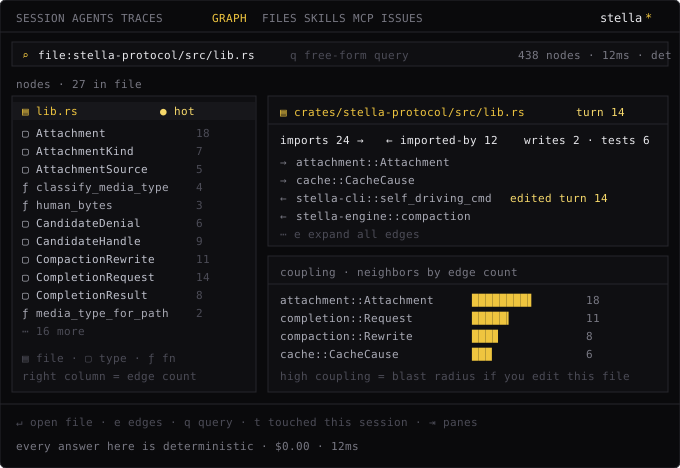
The deck puts the whole index behind one tab. Every answer there is computed locally
rather than sent to a model, which is why it costs $0.00. The coupling ranking at the
bottom is especially useful: it shows how much would be affected if you edit the file
you're looking at.
The index builds itself. stella init builds
it right away, and recall refreshes it as it reads from it. A file watcher built into
the running session (with a 200ms delay, and no background service) keeps it up to
date as files change, for as long as the session runs.
importers connections work for relative TypeScript/JavaScript and Python imports,
and for Rust use/mod paths through the workspace's module tree (at the file
level; external crates aren't resolved). Go and Java package imports, and PHP
namespace use, are indexed but not resolved.
Domain tags
stella init figures out a short set of tags for your project and saves them to
.stella/domains.toml. These tags connect everything in the engine: memories,
reflections, episodes, skills, and code-graph nodes all carry domain tags, so recall
can connect a lesson, a past episode, and a file to the same area of your codebase.
Put it under version control
Memories, rules, skills, and domain tags are all plain files. Commit them, and your
whole team's agents share the same accumulated knowledge. The .db files hold local
state and shouldn't be committed; see
what to commit.
Agent Engine Paths
Every way to reach stella's agent engine — one-shot runs, the REPL, the Command Deck, goal rounds, CI monitoring, sub-agents, and fleets — and when to use each.
Agent Modes
The different ways to drive stella — chat in the Command Deck, one-shot runs, judged goal mode, CI monitoring, and parallel fleets — and how to pick between them.