Agent Skills
Reusable capabilities in SKILL.md files. Covers project and user scopes, versioning, the public registry, and how skills reach the model through recall.
A skill is a reusable capability written in Markdown: a checklist, a workflow, a house style. stella brings it in automatically when it's relevant, and you can also run it directly as a slash command.
The format
A SKILL.md file with frontmatter and a Markdown body:
---
name: release-checklist
description: How we cut a release — versioning, changelog, tag, publish.
domains: [build, ci]
---

1. Bump the workspace version…
2. Regenerate the changelog…
3. Tag `vX.Y.Z` and push — CI publishes.
Both layouts work: the nested layout (<slug>/SKILL.md) and the flat layout (<slug>.md). The frontmatter fields:
nameThe skill's slug. This is also the ⚡ slash command it registers.
Default the filename stem, or the directory name
descriptionRequiredOne line on what the skill is for. Unlike a command or an agent, a skill has no fallback here. A SKILL.md without a description is skipped, with a diagnostic, because the description is what skill selection matches against.
domainsDomain tags from .stella/domains.toml, used by skill selection alongside the text match.
Default []
bodyRequiredThe know-how itself. An empty body is skipped, with a diagnostic.
Scopes and precedence
Commit it, and the team shares the playbook.
Your own conventions, in every repo you open.
When both scopes define the same name, the project version wins for recall. The SKILLS tab lists both.
Reaching the model
- Automatic recall. Each turn, skill selection (matching text and domains against your prompt) picks the relevant skills and adds them to the recall block. No need to invoke anything.
- Explicit invocation. Every skill is also a ⚡ slash command.
/release-checklist ship 1.4adds the skill body as explicit instructions above your task. - Auto-promotion. Lessons that keep showing up in the reflection log get promoted into new skills automatically. Your agent writes its own playbook over time.
Versions and pinning
Every edit creates a new version. History lives under <slug>/versions/vN/SKILL.md, and a per-scope file tracks which version is pinned (active) and which skills are disabled (kept on disk, left out of recall). Pin an older version to roll back, without losing the newer one.
<skills-dir>/<slug>/SKILL.md              ← the loaded definition
<skills-dir>/<slug>/versions/v1/SKILL.md  ← immutable version snapshots
<skills-dir>/<slug>/versions/v2/SKILL.md
<skills-dir>/.stella-skills.json          ← { "disabled": [...], "pins": { "<slug>": 2 } }
No pin entry means the latest version is active. This tracking file's name starts with a dot, so the recall process, which only reads *.md and <slug>/SKILL.md, never sees it.
Public registry
stella connects to the community skills registry through npx skills:
- The SKILLS tab's search runs
npx skills find <query>. - Installing from the registry pane runs
npx skills add, staging the result in a private temp folder, then adds the resultingSKILL.mdinto your chosen scope. Installing always asks you to confirm first.
You can override the underlying commands (STELLA_SKILLS_SEARCH_CMD, STELLA_SKILLS_INSTALL_CMD, STELLA_SKILLS_USE_CMD) to point at a private registry.
Managing skills
/skills opens the SKILLS tab. Installed skills show their own injection counts and token cost, so you can see the ones that never fire and prune them. Below those are the skills stella learned from its own traces, and an unsigned registry result installs disabled by default.
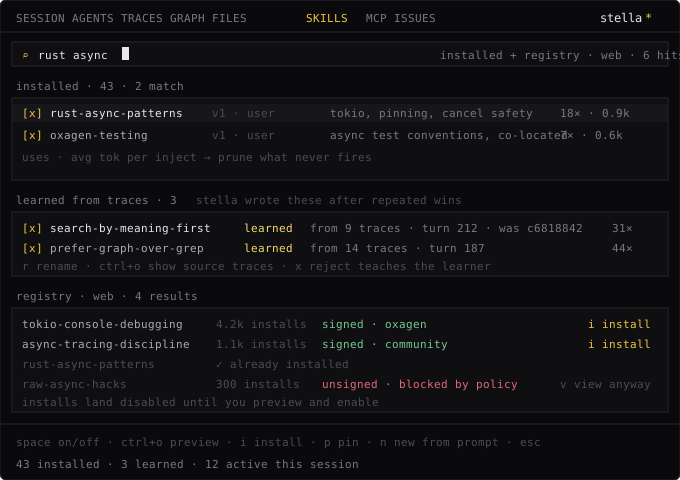
Keys in this tab:
spaceEnable or disable the selected skill. A disabled skill stays on disk and drops out of recall.
ctrl+oPreview the highlighted skill's body in an overlay, in both the installed pane and the registry pane.
eEdit. Saving always writes a new version and pins it. No earlier version is changed or deleted.
pPin a specific version. This is the rollback control. Pinning never creates a new version.
nCreate a new skill, drafted by the model from a description you give it.
ctrl+x ×2Uninstall: delete from disk. The first press arms it, and the second one commits.
← / →Switch panes: installed and registry search.
/context shows which skills (and MCP servers) are active in the current session.
Skills are prompt-level guidance. For capabilities with hard boundaries, like new executable actions or blocked paths, use custom tools, hooks, or guard rules instead.
Built-in Tools
Every tool the stella agent can call in every session. Covers the shell, file create/read/update/delete, code search, sub-agent delegation, the task board, scratch state, the environment probe, and the forge, and notes which ones are read-only.
Custom Commands
Add your own prompt templates to the slash menu, in Markdown or TOML. Covers $ARGUMENTS expansion, namespaces, and project or user scopes.