MCP Servers
Connect Model Context Protocol servers to stella so their tools merge into the agent at session start.
stella can connect to Model Context Protocol (MCP) servers and merge their tools into the agent. This lets you extend the agent with capabilities that live outside your workspace, without writing a custom script tool for each one.
Configuration
MCP servers are configured in two files with the same format:
.stella/mcp.tomlin your workspace holds the servers one repository uses.~/.stella/mcp.tomlholds the servers you want in every repository.$STELLA_HOMEmoves it, along with the rest of~/.stella.
stella reads both at session start, connects to each configured server, and merges the tools it offers into the agent, alongside the built-in tools and any custom tools. A missing file is skipped without a message. A file that does not parse is named in a notice, its servers are skipped, and the servers in the other file still start. stella won't follow a symlink to either file. It also refuses a file whose directory another user can write to, since that user could swap the file.
Same server name in both files
When both files configure a server with the same name, the workspace entry is used and the user entry is ignored. The workspace file is closer to the work. It can point a server at that repository's paths or at a project account, and a repository that needs a server set up differently can say so without you editing your own file. This is the order every other stella setting follows: the narrower scope wins.
The workspace entry replaces the user entry whole. stella does not merge the two field by field, so a granted decision in your user file never applies to a command the repository chose.
The quickest way to add a server is the stella mcp command family. No hand-editing required:
stella mcp search github          # find one in the registry
stella mcp install github         # write the .stella/mcp.toml entry — withheld until granted
stella mcp grant github           # read what it declares, then let the model call it
stella mcp list                   # what's configured, which have credentials, which are withheld
stella mcp usage                  # per-server, per-tool call counts from local telemetry
stella mcp remove github          # drop one
stella mcp list and the deck's MCP tab show the servers from both files. stella mcp install adds a server to the workspace file. grant, login, remove and the deck's actions change the file that holds the server. When both files name it, that's the workspace file. To add a server to ~/.stella/mcp.toml, edit the file by hand.
Turning a server on or off is deliberately not a CLI command. It's session-scoped, since it changes a running conversation's tool set, so it lives in the deck's MCP tab (/mcp) instead.
Granting access
A server you install from a registry is a stranger's command line, and installing one takes a single keystroke. So a newly installed server connects but can't act: none of its tools are offered to the model, and any call to one comes back as a refusal.
The handshake is what you review. Connecting is how a server's declared capabilities become knowable in the first place, so the gate sits between the handshake and the first tool call, not before the connection: stella asks the server what it offers, shows you the list, and records your answer.
Either surface asks the same question. Pressing e on an ungranted row in the deck's MCP tab (/mcp) shows the declared tools and grants them. stella mcp grant <name> does the same from a shell, with --yes for provisioning and --revoke to withdraw.
Your answer is recorded as granted in the mcp.toml that holds the server, so every session reads it. You're asked once, not every morning. An entry you wrote by hand carries no granted key and is usable without a grant, since writing the transport yourself is already the review the gate is asking for.
Because tools are added at session start, connecting a new server takes effect on your next session. Each server gets a 10-second connect budget, and connections are isolated per server. One that hangs or fails is recorded and skipped, and it doesn't take the whole session down.
The MCP tab is where this review happens. Each server shows its transport, tool count, handshake speed, and login state, and a new one arrives disabled with its capabilities on display. The code graph sits pinned at the top, since it's part of the product rather than an add-on.
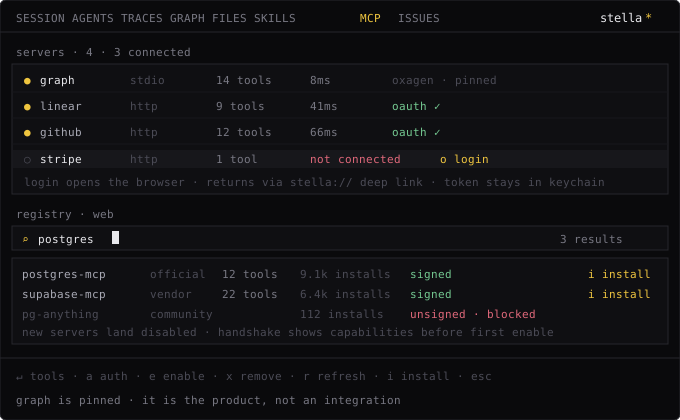
stella tools does not list MCP tools. It prints a note that MCP servers merge more tools at session start. Confirm a server is wired up with stella mcp list, or check its tools from inside a session, in the deck's MCP tab (/mcp).
Trust boundary
A repo's .stella/mcp.toml is not loaded until you trust the repo. An entry can
name an arbitrary cmd that runs at session start, the same remote-execution risk as
git clone && stella, or an attacker-controlled url that workspace content gets
sent to, which carries the same risk as project hooks.
Until you trust the repo, stella skips that file and prints the reason once. The servers in
your own ~/.stella/mcp.toml still start, because only you write to that file. They start in
~/.stella, not in the repo. A runner such as npx looks for packages in the directory it
starts in, so this keeps the repo from swapping in its own package. Opt in per repo:
export STELLA_TRUST_PROJECT=1Scope it with direnv or a shell-profile guard rather than exporting it globally. See the trust boundary for what else the flag controls.
Example configuration
[servers.filesystem]
transport = "stdio"
cmd = "npx"
args = ["-y", "@modelcontextprotocol/server-filesystem", "."]
env = { LOG_LEVEL = "info" }

[servers.github]
transport = "http"
url = "https://mcp.example.com/mcp"
headers = { Authorization = "Bearer …" }
A server entry needs a transport value, stdio or http, and the rest of the fields follow from that choice:
transportRequiredstdio or http. This decides which of the other fields apply.
cmdstdio only, and required there. The program stella launches, talking JSON-RPC over the child process's stdio.
argsstdio only. Arguments passed to cmd.
Default []
envstdio only. The variables the child process receives. See the note on scrubbing below.
Default {}
urlhttp only, and required there. A streamable-HTTP endpoint stella sends JSON-RPC requests to.
headershttp only. Static headers sent with every request, such as an Authorization bearer token or an API key. Values are written to mcp.toml as-is but hidden from logs and debug output.
Default {}
candidate_safeOpt this server into Best-of-N candidate runs. See below. Never guessed at — you always set it yourself.
Default false
grantedWhether the model may call this server's tools. Set by a grant, and by an install (which sets it to false). Left out on an entry you wrote yourself, which counts as granted. See above.
Either way, stella merges in the tools the server reports for the session. Each one is advertised as mcp__<server>__<tool>, so two servers that each expose a search tool never collide. The entry's name in mcp.toml becomes the middle part of that name. To keep that naming unambiguous, an entry name can't contain __ and can't start or end with _. A name that breaks this rule is reported as unavailable, rather than risking one server's tools hiding another's.
A stdio MCP subprocess runs with a scrubbed environment. Ambient shell variables, including credentials like ANTHROPIC_API_KEY or GITHUB_TOKEN, are not passed through. Any variable the server needs must be listed directly in the entry's env table, for example env = { GITHUB_TOKEN = "…" }. The one exception is PATH, which is passed through so a bare runner like npx, uvx, or docker can resolve at all. An env entry named PATH overrides it.
For an HTTP server that uses OAuth instead of a static bearer token, stella mcp login <name> runs the browser flow and stores the tokens in a workspace-owned, owner-only token store instead of in mcp.toml. stella mcp logout <name> forgets them.
MCP tools are treated like any other tool once merged in. They follow the per-tool permission model, and their calls can be gated or blocked with a PreToolUse hook.
Best-of-N candidates
A Best-of-N run (set by a wrapper plugin's candidates setting) runs multiple candidates in isolated git shadow worktrees, so one candidate's edits never leak into another's, or into your real tree, until a winner is picked. MCP servers stay withheld by default during that isolation, because most configured servers are either rooted in the filesystem (which would duplicate the snapshot-rooted built-in read, write, and edit tools) or side-effecting (harmful to run once per candidate, such as a deploy, an issue creation, or a database write).
The servers worth sharing are read-only and don't depend on which tree they're called from: think docs or web search, a code graph, or GitHub and Linear reads. You opt each one in explicitly:
[servers.docs]
transport = "http"
url = "https://docs.example.com/mcp"
candidate_safe = true
candidate_safe defaults to false and is never guessed from a server's own read_only_hint. That hint can't tell "reads an external system" (safe to share) apart from "reads the local tree" (which would return your real tree's content inside a candidate's isolated snapshot, exactly the mistake the isolation exists to prevent). Turn it on only for servers you've checked are genuinely read-only and don't care which directory they run from.
Speculative execution is off the table entirely for MCP tools. They register as mutating (read_only: false) and never claim speculation_safe, so the engine runs each call exactly once, when it's dispatched. An external server's request count and rate limit aren't stella's to spend twice.
Being candidate_safe has two effects:
- Every candidate's engine can call that server's tools live, mid-turn, through the same already-connected session client, with no extra subprocess per candidate.
- Before the fan-out starts, stella calls that server's zero-argument tools once and folds the results into every candidate's starting context. This covers the common case where every candidate would otherwise ask the same read-only question, such as a schema listing, over and over. A tool that needs input is never called this way, since its arguments are never guessed.
Candidates always run non-interactively regardless, since a fan-out of N candidates has no single owner who could answer an interactive prompt.